Get this widget

Google Application


“Google Code Search” enables you to search public source code. Besides, it helps users find out readily useful sources to develop their products.


Google Code Search
Google Code Search

Improve your Internet connection

TCP Optimizer


 TCP Optimizer v3.0.8 (new)


Description:


The program can aid both the novice & the advanced user in tweaking related TCP/IP parameters in Windows, making it simple to tune your technique to the type of Net connection used. The tool makes use of advanced algorithms, & the bandwidth*delay product to find the best TCP Window for your specific connection speed. It provides for simple tuning of all related TCP/IP parameters, such as MTU, RWIN, & even advanced ones like QoS & ToS/Diffserv prioritization. The program works with all current versions of Windows, & includes additional tools, such as testing average latency over multiple hosts, & finding the largest feasible packet size (MTU).


Microsoft Management Consoles

I have the impression that Microsoft does not trust the average PC user. Windows puts out a lot of system tools in dark places. These tools are not displayed in the All Programs menu and must be sought in the control panel or already know them before you can find. These include an application of the system called "Microsoft Management Console" (MMC). Depending on your system, there are about two to three dozen of these utilities. They are present in Windows XP, Vista and 7. Since the system tools, it requires administrator privileges to operate. 

MMC consoles have the extension. Msc and can be run by typing the file name of the console in a command prompt or the Run line. In Windows Vista / 7, the name can also be entered in the search box. The. Msc necessary. You can find a list and description of many of them at this link. 

At this point, I will point out the MMC I consider the most useful for general use. It's called the Computer Management Console and contains most of the tools of the system the average PC owner can use. One of the characteristics of the management consoles is that you can combine a variety of system tools in a single interface and it contains a useful series of MMC in a single package. It is accessed by entering "compmgmt.msc" (without quotes), either in the execution, command or search box. The figure below shows the interface of Windows 7 or Vista, but it is very similar to XP.


Computer management console in Windows

You can see from the figure that some utilities and most common functions are listed. For example, the Device Manager, Disk Management, and the service console can be accessed here. More details about using these tools are in the following references. These tools can also open individual consoles and the file name to enter the list.


CCleaner is a freeware system optimization and privacy tool. It removes unused files from your system - allowing Windows to run faster and freeing up valuable hard disk space

CCleaner is our system optimization, privacy and cleaning tool. It removes unused files from your system - allowing Windows to run faster and freeing up valuable hard disk space. It also cleans traces of your online activities such as your Internet history. There is also a registry cleaner full of options. But the best part is that it's fast (normally taking less than a second to run) and contains NO Spyware or Adware!


Cleans the following:


Internet Explorer 

Temporary files, URL history, cookies, super, Autocomplete form history, index.dat files. 
Firefox 

Temporary files, URL history, cookies, super, download history, form history. 
Google Chrome 

Temporary files, URL history, cookies, super, download history, form history. 
Opera 
Temporary files, URL history, cookies, super, download history. 
Safari 
Temporary files, URL history, cookies, super, is history. 
Other Browsers Supported 
K-Meleon, RockMelt, Flock, Google Chrome Canary, Chromium, SeaMonkey, Chrome Plus, SRWare Iron, Pale Moon, Phoenix, Netscape Navigator, Avant and Maxthon. 

Windows 

Recycle Bin, Recent Documents, Temporary files, log files, clipboard, DNS caching, error reporting, memory dumps, Jump Lists. 

Registry Cleaner 


Advanced features to remove unused entries and old, including File Extensions, ActiveX Controls, ClassIDs, ProgIDs, Uninstallers, Shared DLLs, Fonts, Help files, application paths, icons, invalid shortcuts and more ... 
Third-party applications 
Removes temp files and recent file lists (MRU) from many applications like Windows Media Player, eMule, Google Toolbar, Microsoft Office, Nero, Adobe Acrobat, WinRAR, WinAce, WinZip and many more ... 
100% Spyware FREE 
This software contains no spyware, adware or viruses.


CCleaner Preview
CCleaner
Free


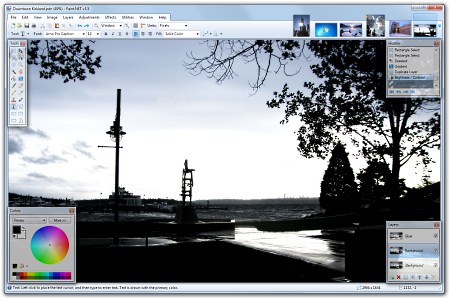
Paint.NET


Paint.NET is free image and photo editing software for computers running Windows. It has an intuitive user interface and innovative, with support for layers, unlimited undo, special effects and a wide variety of useful and powerful tools. An online community active and growing provides friendly help, tutorials, and plugins.

It started development as a design project senior undergraduate college sponsored by Microsoft, and is currently being maintained by some of the alumni that originally worked on it. Originally conceived as a free replacement for Microsoft Paint software that comes with Windows, has become a powerful image and photo editing simple tool. It has been compared with other software digital photo editing, such as Adobe ® Photoshop ®, Corel ® Paint Shop Pro ®, Microsoft Photo Editor, and The GIMP.


Get it now (free download):
Paint.NET v3.5.8 

Youtube Catcher can download videos from Youtube, Google Video, Myspace Video

Youtube Catcher can download videos from Youtube, Google Video, Myspace Video, Yahoo Video Dailymotion Stage6 Veoh. The downloaded videos can be exported to various formats such as MPG, AVI, MP4, 3GP, 3G2, WMV, PSP, MOV, FLV, with the quality you choose.


More stable, reliable and fast! 
Turbo Downloads up to 600% faster! 
Now in only 2 steps to create and burn DVDs! 
Capture video, SWF, MP3 and any website using StreamCatcher mode! 
Record video of your screen, yes you can now record live, Yahoo, Messenger video conferencing etc with a few clicks, even video from sites like Hulu, CBS, directly from your screen! 
New Video Mode Converter, convert lots of files easily with just one click to any output format! 
The introduction of new video encoding profiles / audio format MP4, MP3, MPG, 3GP, 3G2, WMV, AVI, MOV, etc. .. almost any format of input / output supported! 
Built-in profile editor, create, edit and share their custom encoding profiles with the community! 
Mode DVD Creator!. Yes Free YouTube now can burn directly to DVD, just drag any video file in almost any format into the window, which will be automatically converted and recorded onto a DVD + / -R/DVD + /-RW! . Compatible with all DVD / CD recorders! 
DVD disc can be played on any DVD player at home! 
IE browser cache media, surf the Internet Explorer cache for files and SWF video 
Monitor URL. Yes, check your Web browser windows to get their links, even if the address bar is hidden. 
Download and merge several videos into one again. Forget the limitations of time, you can join all the chapters of the same video. 
In normal mode for direct download are compatible with hundreds of sites like YouTube, Megavideo, DailyMotion, FaceBook, Tweetvid, etc. .. 
Multiple languages ​​available! 
And my traits! 
Warranty, a 100% software free and fair, millions of users can not be wrong! 
In Version 2 Now you can create VCDs and audio CDs too! 
If you have a YouTube account, you can access to download the files complete and original! 
Now you can combine existing videos in any format! 
New video search tool helps you find thousands of videos in a few seconds, the results appear on the screen with a low memory usage, you can right click on the results or double click to open a web player feature! 
"Monitor Clipboard" helps you keep track of links copied to clipboard. ! 
Free YouTube now takes advantage of multi-core CPU to convert multiple videos at the same time. Put to work its powerful new multi-core and enjoy the process of power! 
Our guarantee, YouTube Catcher is Safe updates, cleaning, lifetime and the best 100% Freeware no limits! 
YouTube Catcher can authenticate with Dailymotion, Orange and Kewego, this makes it possible to download private rated videos or adult, another new feature is support for playlists, put the url of a playlist and be asked to select the videos you want to get, you can view all items and automatically aTube Catcher will add all the queue manager to download and process each one while you're away from your desk or doing other tasks. 
It has support for playlists, you can put the url of a playlist and ATC will show a screen, then select the videos or simply all Desidero due to a request from users now can copy the url of a search and YouTube Catcher will find the links, for example, you are an attorney and want to search videos about other attorneys, and search the key word on youtube, after copy the url of the results of Free YouTube and read the links and asked to choose the ones you want. Try it and you will love these 2 great features. 
This new release includes two new features, IE Cache Media Browser and packet capture video with this new great tools you can download almost any video from internet, completely free and ease of use characteristic GUI (Graphical User Interface) . New and improved performance!. 

The video packet capture can be accessed from the Tools menu, and is in experimental development is necessary for me to run with administrator privileges to capture traffic. They do not care what browser you are using. 
This new version includes support for more sites, the better and downloads a list of supported parallel actually download, you can set multiple simultaneous downloads and up to 5 simultaneous conversions. 

Even better!. Download several chapters into one file. No videos more divided into 10 minutes, you can download Free YouTube and join each chapter for the full video! 


It natively supports RTMP (Real Time Streaming Protocol) which allows download Free YouTube videos MyPlay more sites like BBC, CNN, ATOM, VH1, Yahoo Music and many more. I also added the ability to correctly decode UTF-8, Windows-1252, so now the titles of the videos can be saved without strange characters. Enjoy this release and do not forget to leave your comments!. 

Requirements: 

Processor: Any i686 or compatible CPU Windows 32 bits. 

Operating System: MS Windows 98, ME, NT, 2000,2003, XP, Vista, Windows 7, Windows 64-bit compatible versions. 

Memory: The minimum required for your operating system. 

DirectX 9.0c Minimum Screen Recorder 

Windows Media Player 8 minimum Screen Recorder 

The latest version of Adobe Flash Player ActiveX (Click here to download from Adobe) 

ASPI driver for VCD recording, you can install it by clicking "Install the ASPI driver" in the help menu. 

Winpcap 4.0 minimum for the current mode Catcher 

For Windows XP, we recommend you use the Service Pack 3 

YouTube Catcher works fine on Linux running the latest version of Wine, but the installer put some mistakes, it's normal, just ignore it. If you can not get Free YouTube to work on your Linux box contact me. 

Thanks to Radek AsfBin Strugalski its fantastic tool that allows you to add functionality Free YouTube to reconstruct ASF / WMV streams. 

radioactivepages.com 

Please note that you must obtain a license if you choose AsfBin use this for commercial use. 

Free YouTube does not decode the DRM protected content and does not support encryption protocols / secured / encrypted (including RTMPE), so that copyright holders can be assured that their rights be infringed. 

* For personal and private use, as it is absolutely forbidden redistribute the content in other formats / media according to the policy at each site. 

* XTube ©, Yahoo ©, © MySpace, Stage6 ©, Veoh ©, Metacafe, Spike etc. tread marks are registered property of their respective owners. This site is not affiliated with them.


ImgBurn is a lightweight CD / DVD / HD DVD / Blu-ray burning application. It supports all windows versions.


ImgBurn is a lightweight CD / DVD / HD DVD / Blu-ray burning application that everyone should have in their toolkit!
It has several 'Modes', each one for performing a different task:
  • Read - Read a disc to an image file
  • Build - Create an image file from files on your computer or network - or you can write the files directly to a disc
  • Write - Write an image file to a disc
  • Verify - Check a disc is 100% readable. Optionally, you can also have ImgBurn compare it against a given image file to ensure the actual data is correct
  • Discovery - Put your drive / media to the test! Used in combination with DVDInfoPro, you can check the quality of the burns your drive is producing

ShareThis

facebook

Search

Total Pageviews